

A long-planned feature — NavMesh — has finally moved forward. Right now I’m thinking about how to organize resource loading and the management of this asset as a whole. In this article, I’ll talk about the difficulties, the approaches, and the first results.
What the Difficulty Is
NavMesh is an asset that depends on your scene or map. It defines the area that monsters and heroes can move through. Consequently:
- The navigation mesh isn’t defined until you’ve finished working on the level
- It can be built manually or even at runtime
- The build process is very long — so caching is a must
Analyzing Approaches
I decided to follow Unity’s path: create a component responsible for storing settings and a reference to the NavMesh resource. But there’s a nuance.
When a project is built, the map is converted from a text representation into a binary format. That would be the ideal moment to trigger NavMesh generation. However:
- Navigation will be separated into its own module
- It has no direct access to the map converter
The Idea: An AssetPostprocessor System
I’m leaning toward a solution similar to Unity’s AssetPostprocessor. This would allow:
- Calling operations from additional plugins for any resource converter
- Influencing the final result
- Registering a new sub-asset of the navigation mesh in the resource manager
Debugging NavMesh: The Beginning
Fortunately, the Recast library lets you wrap the data in an elegant form. But after calling the wrapper, that data needs to be fed to rendering. And that’s where a small inconvenience occurred.
For debugging, I use the functionality of the Gizmos class — there a developer can find plenty of useful primitives to their taste. However, how wireframe and polygon modes are displayed had been bothering me for a while.
Rendering Refactoring
Rolling up my sleeves, I did some refactoring:
- Optimized redundant memory writes
- Added topology definition to the Mesh class — now it can store not only polygons but also lines, points, and much more
What changed:
- Removed the wireframe setting from materials — now it’s all handled through Mesh
- Removed the redundant solid.shader — it was no longer needed
NavMesh in Action: A First Look
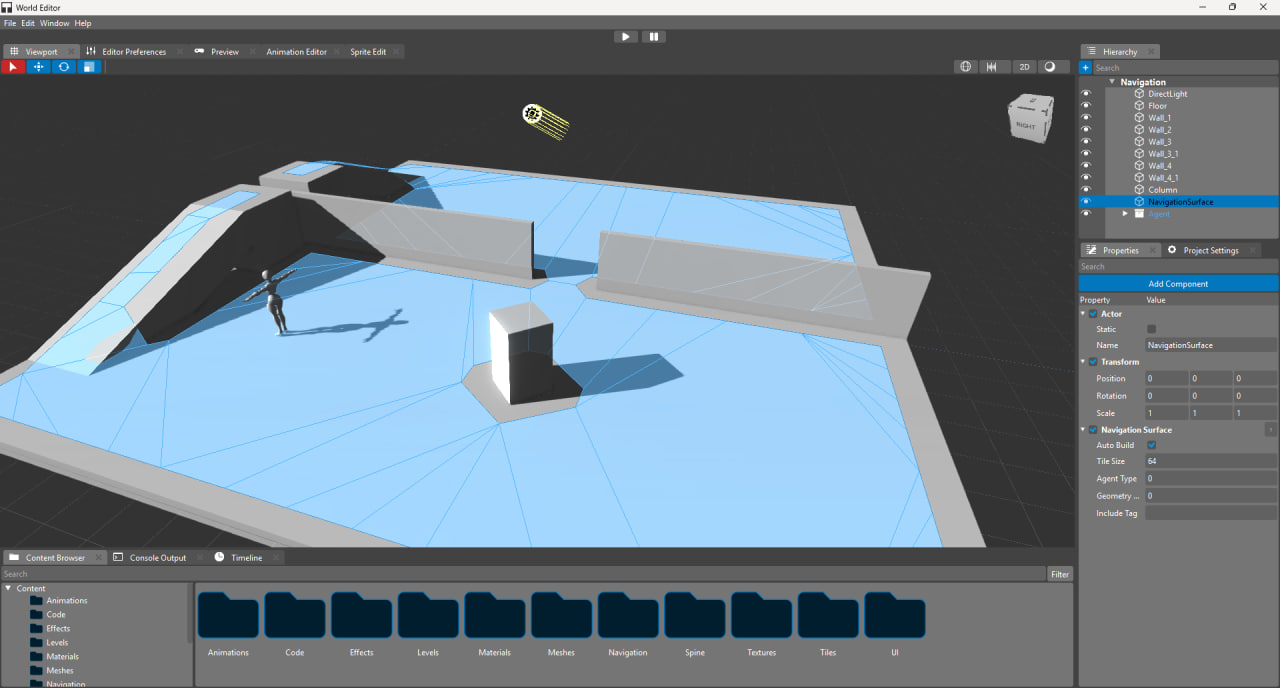
As promised, I’m showing the current status of the navigation mesh. For now — a screenshot.
In it, you can see a small sandbox scene where we’re testing NavMesh generation. The result of the build is already visible.
What’s in the screenshot:
- A test scene with geometry for navigation
- The generated NavMesh (displayed over the scene)
- Visualization via the updated Gizmos system
What already works:
- Building NavMesh based on scene geometry
- Displaying the result in the editor
- Integration with the debugging system
What’s Next
I’ll be working on:
- Caching the generated NavMesh
- Integration with the resource system
- Support for dynamic changes